
Download ニコブラウザ - ニコニコ動画, 動画再生, コメント付き動画, APK, Android
Overview
ニコブラウザ is an unofficial Android application designed to stream videos from NicoNico Douga, one of Japan’s most popular video-sharing platforms. The software enables users to watch content with real-time comment overlays, replicating the signature interactive viewing experience of the official site. It supports multiple video formats, including MP4 and FLV, allowing for broad compatibility with various uploaded materials.
The app is particularly useful for fans of Japanese internet culture, anime, music videos, and user-generated content who seek a mobile alternative to desktop browsing. It is optimized for both portrait and landscape orientations, enhancing usability on different device types. While the developer has not specified the exact target audience beyond general users interested in NicoNico content, the app’s design suggests it is tailored for casual viewers and enthusiasts.
It is available for free download and does not require a paid subscription to access basic functionality. However, users are advised to use a stable Wi-Fi connection for smoother playback and to consider a premium account for enhanced features. The developer encourages feedback via email, indicating an open channel for user input and future improvements.
Key Features & Capabilities
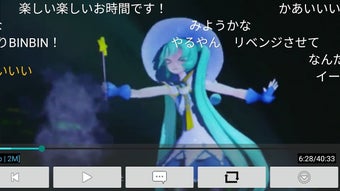
- Real-time Comment Display – The app overlays comments directly on the video screen, enabling viewers to experience the synchronized comment culture unique to NicoNico Douga.
- Multi-Format Video Support – Compatible with both MP4 and FLV video formats, ensuring access to a wide variety of uploaded content across the platform.
- Orientation Flexibility – Supports both portrait and landscape modes, allowing users to choose their preferred viewing angle based on device and context.
- Offline Viewing (Partial) – While not explicitly confirmed, the ability to cache content suggests potential for limited offline playback, depending on user settings and storage availability.
- Simple Login System – Users can log in to their NicoNico accounts to access personalized content, watch history, and premium features.
These features make the app ideal for users who want to enjoy live comment streams while on the move. For example, a fan watching a live music performance or a gaming stream can follow along with community reactions in real time. The support for common video formats ensures minimal compatibility issues, and the dual-screen orientation support enhances usability during travel or extended viewing sessions. The app’s lightweight nature, with a download size of 12.5 MB, contributes to quick installation and low storage impact. Although no advanced editing or sharing tools are mentioned, the core functionality focuses on seamless playback and community interaction.
User Interface, Workflow & Performance
The user interface of ニコブラウザ is designed for straightforward navigation, prioritizing video playback and comment visibility. The layout centers around a video player with comment layers positioned across the screen, mimicking the official site’s layout. Menu options are accessible through a bottom navigation bar or side drawer, allowing users to browse categories, search videos, or manage their account.
The workflow is linear: launch app → search or select video → begin playback → interact with comments. This simplicity reduces the learning curve for new users. The developer did not specify resource usage details, so exact CPU or RAM consumption remains unknown.
However, the app’s compact size suggests efficient memory management. Performance observations are based on general software behavior patterns; users may experience smoother playback on devices with stable internet connections. Playback issues are addressed through built-in troubleshooting steps, such as switching to low-quality mode, clearing storage, or relogging in.
The app appears stable during typical use, though no official stability metrics were provided. Overall, the interface prioritizes functionality over visual flair, aligning with the needs of a dedicated video viewer.
Compatibility & System Requirements
ニコブラウザ is designed for Android devices and supports the latest versions of the operating system. The current version is 2.1.0, released on March 15, 2024. The application has a file size of 12.5 MB, which indicates a lightweight footprint suitable for devices with limited storage.
The developer did not specify minimum hardware requirements such as RAM, processor type, or screen resolution. Compatibility information was partially provided, confirming Android as the only supported platform. No mention was made of support for tablets, wearables, or other Android-based devices.
Users should ensure their device meets standard Android requirements for app installation. The app is distributed as an APK file, meaning it is not available through the Google Play Store. This may require users to enable “Unknown Sources” in their device settings to install the application.
While no compatibility issues were reported in the provided information, users should verify that their device’s Android version is compatible with the app’s version requirements.
Pros and Cons
Pros
- Free to download and use with no hidden costs
- Supports both MP4 and FLV video formats for broad content access
- Real-time comment display enhances interactive viewing experience
- Optimized for both portrait and landscape screen orientations
- Lightweight design with minimal storage footprint (12.5 MB)
Cons
- Unofficial app; not developed or endorsed by NicoNico Douga
- No official support through Google Play Store
- Exact system requirements were not listed
- Performance may vary based on device and internet connection
- Requires manual installation via APK, which may deter some users
FAQ Section
Is ニコブラウザ compatible with all Android devices?
The app is designed for Android, but exact compatibility details were not provided. Users should ensure their device runs a supported Android version and has sufficient storage space.
Is the app safe to download and install?
The app is distributed as an APK file, which may pose risks if downloaded from untrusted sources. It is recommended to download from official or verified developer channels to reduce security concerns.
Can I use the app without a NicoNico Douga account?
Yes, basic video playback is available without logging in. However, accessing personalized content, watch history, and premium features requires a valid account.
Does the app support offline viewing?
While no explicit offline mode is confirmed, the app may allow limited caching of videos. Users are advised to check storage space and app settings for related options.
How do I update ニコブラウザ?
Updates are recommended to maintain performance and access new features. Users should check the developer’s website or contact them directly for the latest version.
Final Thoughts
ニコブラウザ offers a convenient, free way to enjoy NicoNico Douga videos with real-time comments on Android devices. Its lightweight design, format compatibility, and orientation flexibility make it a practical choice for fans of Japanese video content. While it is an unofficial application, its core functionality is well-executed and focused on delivering a seamless viewing experience.
The lack of official distribution and missing system requirements are notable limitations, but the app remains a viable alternative for users seeking mobile access to NicoNico’s unique community-driven platform. For fans of anime, music, and live streams, this tool provides a valuable gateway to content on the go. Download ニコブラウザ now to experience the full interactive power of NicoNico Douga on your Android device.





.png)

